

Description
The EU Cyber Resilience Act (CRA) and NIS2 directive expect businesses to know
what software they run, monitor it for known vulnerabilities, patch without
delay — and to be able to prove all of that. Dragon Compliance turns your
WordPress site into something you can hand to an auditor:
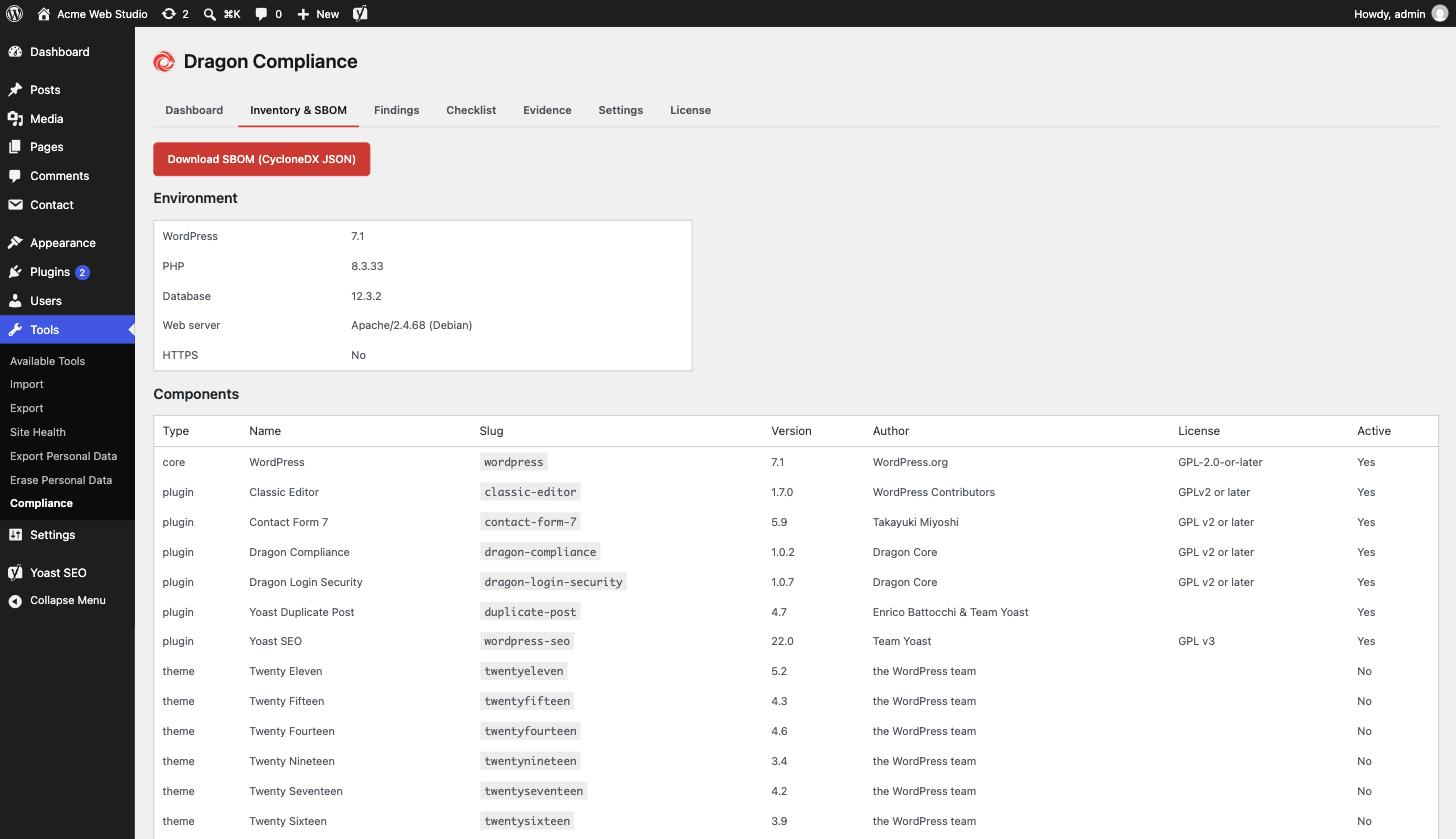
- Software inventory — WordPress core, every plugin and theme with version,
author and license, plus the PHP/database/server environment. - SBOM export — download a standards-compliant CycloneDX 1.6 JSON Software
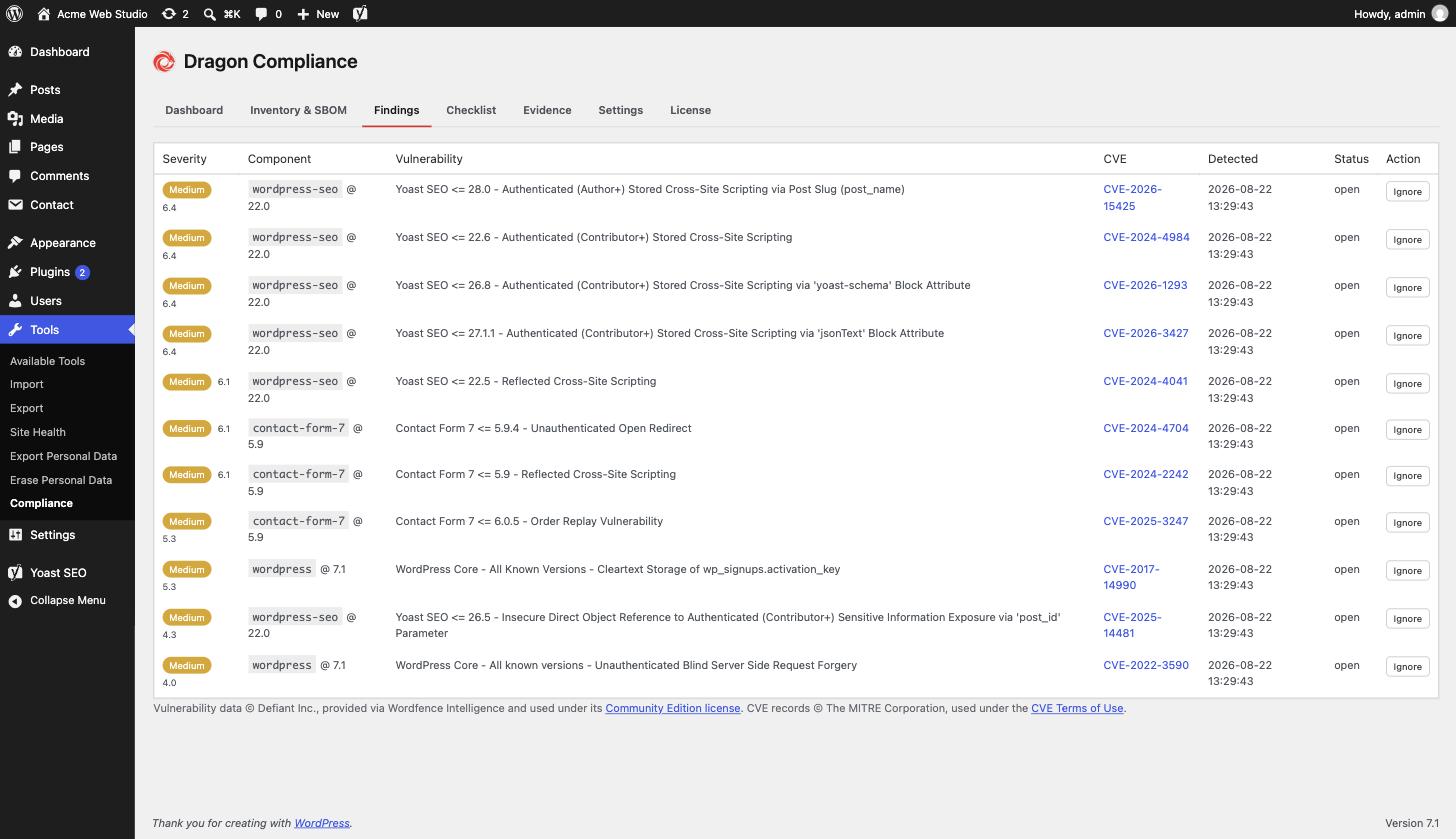
Bill of Materials, the artifact auditors and enterprise customers ask for. - Vulnerability monitoring — a daily scan matches your inventory against
the Wordfence Intelligence vulnerability database and lists affected
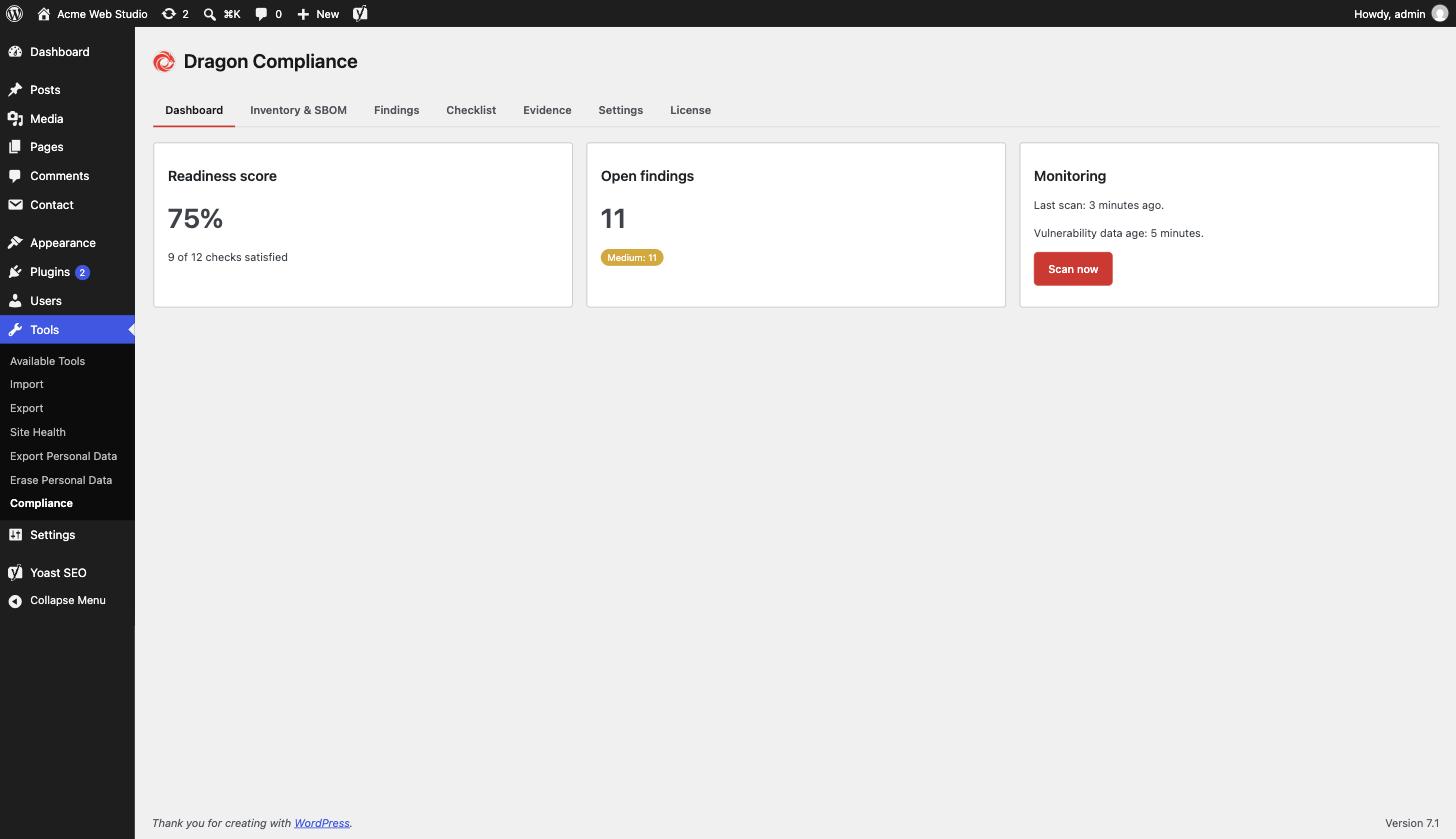
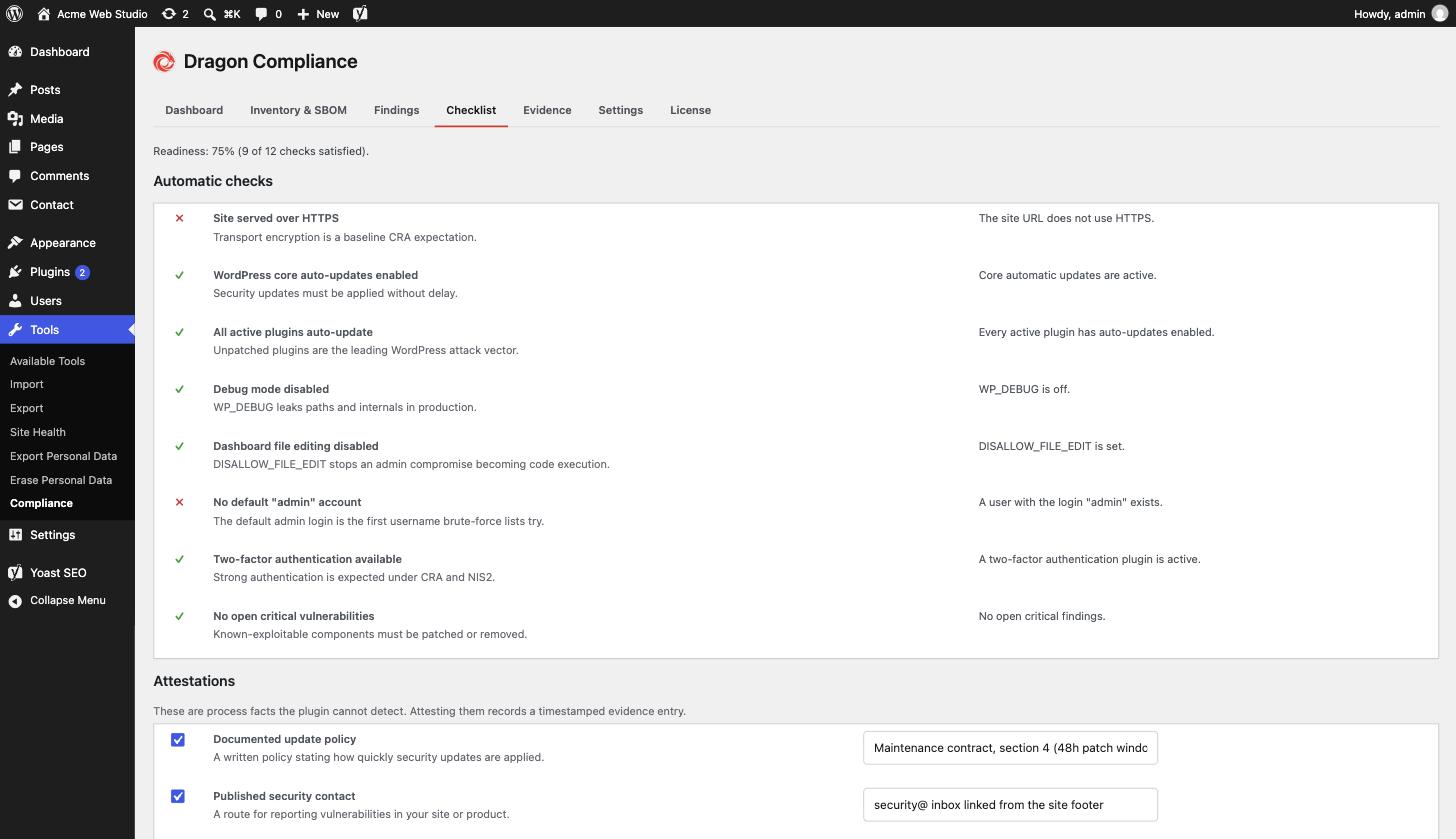
components by severity. New critical findings can email the site admin. - CRA readiness checklist — automatic checks (HTTPS, auto-updates coverage,
debug mode, file editing, 2FA, default admin account, open criticals) plus
manual attestations for process facts like your update policy and backups,
with a completion score. - Evidence log — every scan, detection, resolution and attestation change
is recorded with a timestamp, building the audit trail regulators expect.
Everything is processed locally on your server. Your inventory is never
uploaded anywhere — the only outbound request is downloading the public
vulnerability database.
Everything above is free, fully functional and unlimited.
Dragon Compliance Pro
For agencies and businesses that answer to clients or auditors:
- White-label scheduled compliance reports
- SBOM snapshots with diffs, and SPDX 2.3 export
- Tamper-evident hash-chained evidence log
- Time-to-patch metrics
- Alert routing: multiple recipients, signed webhooks, Slack
- NIS2 mapping view
See Dragon Compliance Pro for details.
External services
This plugin can connect to the Wordfence Intelligence vulnerability database
(a service by Defiant Inc.) to download its public list of known WordPress
vulnerabilities. This is required for the vulnerability-monitoring feature
and happens once daily, and when you press “Scan now”.
Only a standard HTTP request with your Wordfence Intelligence API token is
sent — no data about your site, its inventory or its users is transmitted.
You need a free wordfence.com account to generate a token; without one, the
plugin’s other features work normally and monitoring stays off.
Wordfence terms of service: https://www.wordfence.com/terms-of-use/
Wordfence privacy policy: https://www.wordfence.com/privacy-policy/
If the separate Dragon Compliance Pro add-on is installed and licensed, the
same vulnerability list is downloaded from Dragon Core (api.dragoncore.ltd)
instead, so no Wordfence account is needed. That request carries only your
Dragon Core licence key and site hostname (for licence validation) — again,
nothing about your inventory or users. Dragon Core serves an unmodified copy of
the Wordfence Intelligence feed, including its copyright notices. This
plugin only ever downloads the feed from www.wordfence.com or
api.dragoncore.ltd; no other host is accepted.
Dragon Core terms: https://dragoncore.ltd/terms
Dragon Core privacy policy: https://dragoncore.ltd/privacy
Screenshots
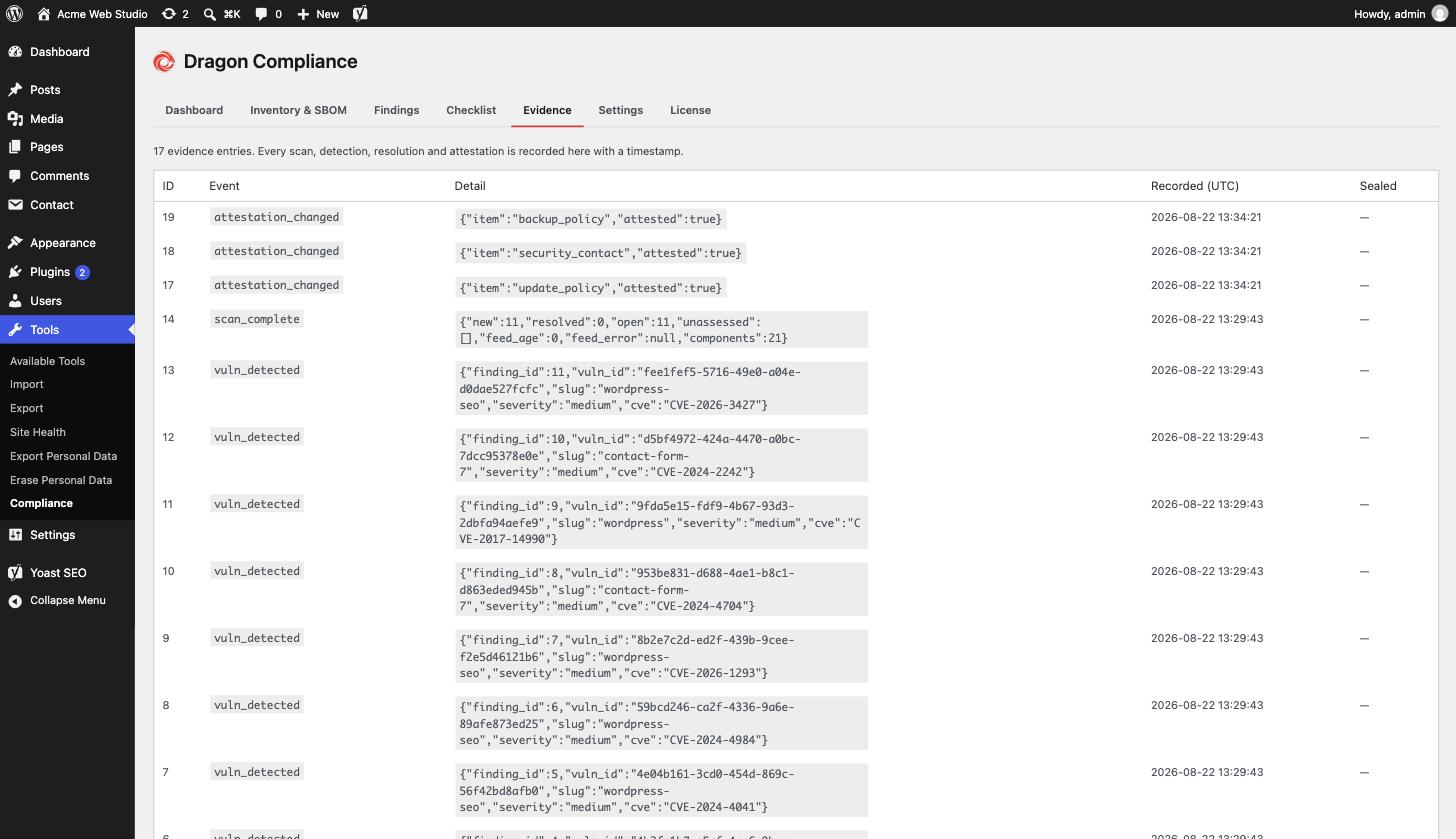
Installation
- Upload the plugin files to
/wp-content/plugins/dragon-compliance, or install through the WordPress plugins screen. - Activate the plugin through the ‘Plugins’ screen.
- Go to Tools Compliance.
- (Optional, for vulnerability monitoring) Create a free wordfence.com account, generate an API token under Dashboard Integrations, and paste it under Tools Compliance Settings.
FAQ
-
Does the CRA apply to my site?
-
If your WordPress site is part of a commercial digital product or service
offered in the EU, parts of the CRA and NIS2 likely apply to your business.
This plugin gives you the technical evidence base — it is not legal advice. -
Where does the vulnerability data come from?
-
From the Wordfence Intelligence Community Edition database, matched locally
against your installed versions. Your inventory never leaves your server. -
What SBOM formats are supported?
-
CycloneDX 1.6 JSON in the free plugin. Dragon Compliance Pro adds SPDX 2.3
and automatic SBOM snapshots with diffs. -
What is an SBOM, and why would I need one?
-
A Software Bill of Materials lists every software component you run, with versions and licenses — like an ingredients label for your site. Auditors, enterprise customers and EU regulation increasingly ask for one. This plugin exports yours in the standard CycloneDX format in one click.
-
When do the CRA obligations start?
-
The Cyber Resilience Act’s vulnerability and incident reporting obligations begin in September 2026, with the remaining requirements following in 2027. If the CRA touches your business, the evidence trail is worth starting now — findings and attestations only prove a history if they have one.
-
Will it slow down my site?
-
No. Scans run in the background once a day via WP-Cron, there is no front-end code at all, and the vulnerability match happens locally against a cached copy of the database.
-
Is this a malware scanner?
-
No. It matches your installed software versions against a database of
publicly known vulnerabilities. It does not scan files for infections.
Reviews
There are no reviews for this plugin.
Contributors & Developers
“Dragon Compliance” is open source software. The following people have contributed to this plugin.
Contributors
Translate “Dragon Compliance” into your language.
Interested in development?
Browse the code, check out the SVN repository, or subscribe to the development log by RSS.
Changelog
1.0.6
- New: the vulnerability feed source can now be supplied by Dragon Compliance Pro, which downloads it from Dragon Core so licensed sites need no Wordfence account. The free plugin only accepts www.wordfence.com or api.dragoncore.ltd as a source — any other host is ignored.
- Improvement: the dashboard and Findings screens now say when monitoring is configured but no vulnerability data has been downloaded yet, and show why the last download failed, instead of looking healthy with nothing checked.
- Hardening: the feed request no longer follows redirects; the Wordfence token is attached to the request after the source is validated and is never exposed to other plugins; an oversized feed record aborts the refresh (keeping the last good data) rather than being read into memory; an empty local index is never revalidated with a conditional request.
- Free users: no change; your Wordfence token keeps working exactly as before.
1.0.5
- Security: the stored Wordfence Intelligence API token now uses authenticated encryption (tamper-detecting), so a modified ciphertext is rejected rather than decrypted.
- New: vulnerability monitoring re-scans immediately when a plugin or theme is installed, updated or removed, instead of waiting for the next daily run — newly added software is checked straight away.
1.0.4
- Expanded the plugin listing: clearer free vs Pro breakdown, fuller FAQ, and a live-preview blueprint.
1.0.3
- Added screenshots of every screen to the plugin listing.
1.0.2
- Compatibility: tested up to WordPress 7.1.
- Housekeeping: corrected the contributor name in the plugin readme.
1.0.1
- Performance: new database index keeps evidence sealing fast as the log grows.
- New: “Delete data on uninstall” checkbox in settings.
- Polish: helpful empty states on the Inventory and Evidence screens; accessibility improvements.
1.0.0
- Initial release: inventory, CycloneDX 1.6 SBOM export, daily vulnerability
monitoring via Wordfence Intelligence, CRA readiness checklist with
attestations, evidence log, critical-finding email alert.