Title: Nice Select for WordPress
Author: Rupash Das
Published: March 23, 2024
Last modified: September 14, 2026
---
Search plugins

# Nice Select for WordPress
By [Rupash Das](https://profiles.wordpress.org/rupash/)
[Download](https://downloads.wordpress.org/plugin/nice-select-for-wp.1.3.0.zip)
* [Details](https://sa.wordpress.org/plugins/nice-select-for-wp/#description)
* [Reviews](https://sa.wordpress.org/plugins/nice-select-for-wp/#reviews)
* [Installation](https://sa.wordpress.org/plugins/nice-select-for-wp/#installation)
* [Development](https://sa.wordpress.org/plugins/nice-select-for-wp/#developers)
[Support](https://wordpress.org/support/plugin/nice-select-for-wp/)
## Description
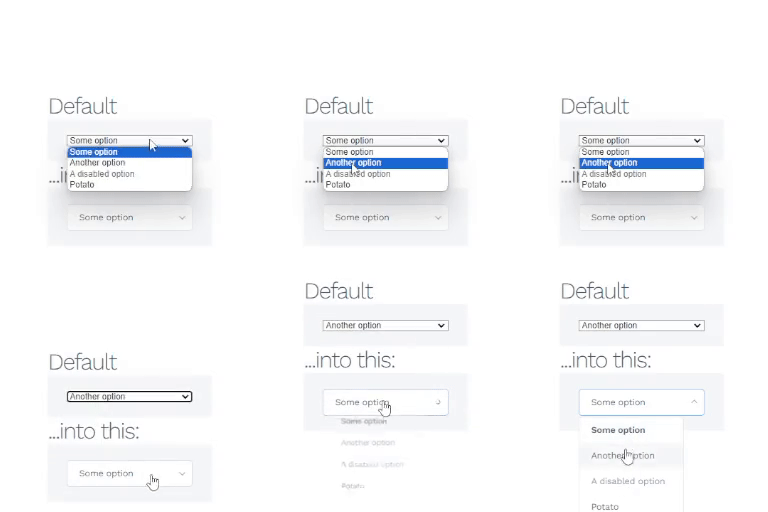
Nice Select for WordPress improves the appearance and behavior of select elements
on your WordPress website, including `` dropdowns, with no code
required.
Key Features:
– Sleek, customizable UI for dropdowns, styled via the admin settings
page. – Optional search box for filtering long option lists, on both single and
multi-selects. – Full `` support: selected options show as removable
tags, with keyboard navigation, `` group headers, and Select All / Clear
All actions – configurable to close after each pick and to cap the number of selections
allowed. – Customizable settings for selector, alignment, full width, placeholder
text, and custom CSS. – Works out of the box with popular form plugins (Contact
Form 7 and others) and with fields added dynamically after page load.
### License
Nice Select for WordPress is licensed under the GPLv2 or later.
### Author
Developed by Devrupash
### Support
For support, please visit the WordPress support forum: https://wordpress.org/support/
plugin/nice-select-for-wp
## Screenshots
[⌊Nice Select settings page.⌉⌊Nice Select settings page.⌉[
Nice Select settings page.
## Installation
1. Go to your WordPress admin area.
2. Navigate to “Plugins” > “Add New.”
3. In the search box, enter “Nice Select for WordPress” and press Enter.
4. Locate the plugin in the search results, and click “Install Now.”
5. Once installed, click “Activate” to activate the plugin.
6. Configure the settings via the “Nice Select” menu in the WordPress admin.
## FAQ
Q: How do I configure the appearance of select elements?
A: Navigate to the “Nice
Select” menu in the WordPress admin, and you will find options to customize the
selector, alignment, full width, placeholder text, search, and custom CSS.
Q: Does it support `` dropdowns?
A: Yes. Multi-selects automatically
render as a tag-based control – no separate setting needed. You can additionally
enable a search box, show or hide the Select all / Clear all links, close the dropdown
after each pick, and set a maximum number of selections, all from the “Nice Select”
settings page.
Q: Will it work with my form plugin?
A: It’s built to work with any plugin that
renders a standard HTML ``, including Contact Form 7 and Gravity Forms,
and it automatically picks up selects that are added or revealed after the page
loads (AJAX content, popups, conditional form logic).
Q: Can I contribute to the development of this plugin?
A: Yes, you are welcome
to contribute to the development on GitHub: Nice Select for WordPress on GitHub
## Reviews
There are no reviews for this plugin.
## Contributors & Developers
“Nice Select for WordPress” is open source software. The following people have contributed
to this plugin.
Contributors
* [ Rupash Das ](https://profiles.wordpress.org/rupash/)
[Translate “Nice Select for WordPress” into your language.](https://translate.wordpress.org/projects/wp-plugins/nice-select-for-wp)
### Interested in development?
[Browse the code](https://plugins.trac.wordpress.org/browser/nice-select-for-wp/),
check out the [SVN repository](https://plugins.svn.wordpress.org/nice-select-for-wp/),
or subscribe to the [development log](https://plugins.trac.wordpress.org/log/nice-select-for-wp/)
by [RSS](https://plugins.trac.wordpress.org/log/nice-select-for-wp/?limit=100&mode=stop_on_copy&format=rss).
## Changelog
#### 1.3.0
* Style: switched the default accent color from blue to a neutral gray, so the
dropdown reads as polished without leaning on a specific brand color.
* Fix: removed the discouraged `load_plugin_textdomain()` call – WordPress.org
has auto-loaded plugin translations since 4.6, so this was dead code.
* Fix: `Domain Path` plugin header pointed at a `/languages/` folder that doesn’t
exist in this plugin; removed the header.
* Fix: plugin header’s `Plugin Name` (“Nice select for WP”) didn’t match the readme’s
title (“Nice Select for WordPress”); aligned them.
* Housekeeping: silenced two output-escaping false positives (values were already
escaped piece-by-piece before being assembled) and one nonce-verification false
positive (read-only page check, not form processing) flagged by the WordPress
Plugin Check tool, with inline justification for each.
#### 1.2.3
* Fix: plugin header/readme claimed “Requires at least: 4.0”, but the settings
page calls `wp_enqueue_code_editor()`, which was introduced in WordPress 4.9 –
a site on WP 4.0-4.8 would hit a fatal error opening the settings page. Corrected
to 4.9.
#### 1.2.2
* Fix: submitting a form without picking a real option in a select that has placeholder
text set could fail server-side validation on plugins that check the submitted
value against the field’s declared options (confirmed with Contact Form 7, which
showed “Undefined value was submitted through this field”). The placeholder was
implemented as a real, pre-selected `` carrying the placeholder text
as its value; it now submits an empty value instead, so non-required fields pass
through and required fields correctly show a normal “this field is required”
message.
* Fix: four settings added in 1.2.0/1.2.1 (Enable Search, and the three new multi-
select settings) were missing from the uninstall cleanup list and would have
been left behind in the database after uninstalling.
* Fix: leaving “Max Selections” blank saved and displayed a literal “0” instead
of staying blank (functionally both meant unlimited, but the blank/placeholder
text is clearer).
* Housekeeping: expanded the readme’s description, tags, and FAQ to cover search
and multi-select.
#### 1.2.1
* Add: three new multi-select settings – show/hide the Select all / Clear all links,
close the dropdown after each pick instead of staying open, and a maximum-selections
limit (with unselectable options greyed out once the limit is reached).
* Fix: the original `` element was left visible above the new
tag control instead of being hidden.
* Fix: the multi-select’s option list rendered outside its dropdown panel instead
of inside it, due to CSS inherited from the single-select’s positioning rules.
#### 1.2.0
* Add: search box for dropdown lists (single- and multi-select), behind a new “
Enable Search” setting.
* Add: proper `` support, rendered as a removable-tag control (
previously the plugin had no multi-select handling at all).
* Add: Select all / Clear all actions and `` group headers for multi-
select.
#### 1.1.2
* Fix: dropdown would flash open and immediately close when the select is wrapped
in a `` (Contact Form 7 and many other form plugins do this). Clicking
inside a `` makes the browser auto-forward a click to its associated control,
which nice-select’s own “click outside” handler then treated as a click outside
the dropdown, closing it instantly.
#### 1.1.1
* Fix: clicking the dropdown did nothing when the select was wrapped in an inline
container (e.g. Contact Form 7’s `.wpcf7-form-control-wrap` span). The dropdown
used `float: left`, which collapses an inline parent’s box to zero size, so real
clicks landed on the invisible parent instead of the dropdown. Switched to `display:
inline-block`.
#### 1.1.0
* Style: refreshed the default dropdown look (accent-colored border/arrow on hover
and open, subtle shadow, highlighted hover/selected options) so it reads as a
distinct, styled control instead of a plain box.
* Fix: selects added or revealed after page load (AJAX content, popups, conditional
form logic such as Gravity Forms conditional fields) are now automatically enhanced
instead of being left unstyled/misaligned.
* Fix: script cache-busting no longer forces a fresh download of plugin JS on every
single page load.
* Security: settings are now sanitized and validated on save; custom CSS is rendered
via `wp_add_inline_style()` instead of client-side DOM injection.
* Housekeeping: plugin options are now stored under a `nsfw_` prefix to avoid collisions(
existing settings are migrated automatically); options are removed on uninstall.
#### 1.0.1
* Style and error fix.
#### 1.0.0
* Initial release.
## Meta
* Version **1.3.0**
* Last updated **2 weeks ago**
* Active installations **20+**
* WordPress version ** 4.9 or higher **
* Tested up to **7.1.2**
* PHP version ** 5.2 or higher **
* Language
* [English (US)](https://wordpress.org/plugins/nice-select-for-wp/)
* Tags
* [dropdown](https://sa.wordpress.org/plugins/tags/dropdown/)[multiselect](https://sa.wordpress.org/plugins/tags/multiselect/)
[search](https://sa.wordpress.org/plugins/tags/search/)[select](https://sa.wordpress.org/plugins/tags/select/)
* [Advanced View](https://sa.wordpress.org/plugins/nice-select-for-wp/advanced/)
## Ratings
No reviews have been submitted yet.
[Your review](https://wordpress.org/support/plugin/nice-select-for-wp/reviews/#new-post)
[See all reviews](https://wordpress.org/support/plugin/nice-select-for-wp/reviews/)
## Contributors
* [ Rupash Das ](https://profiles.wordpress.org/rupash/)
## Support
Got something to say? Need help?
[View support forum](https://wordpress.org/support/plugin/nice-select-for-wp/)