Description
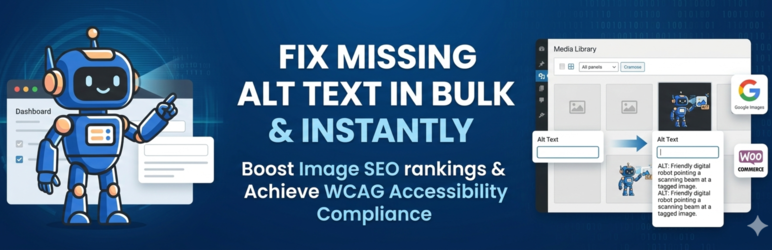
BeepBeep AI is a WordPress AI alt text generator for site owners who want faster image SEO, stronger accessibility, and less manual work. It scans your WordPress Media Library and WooCommerce product images, finds missing or weak alt text, and helps you generate AI alt text in bulk from one clean workflow. Instead of editing image fields one by one, you can scan the library, bulk-generate descriptive alt text, review the results, and save approved changes back into WordPress.
Better alt text helps search engines understand your images, supports Google Images and product discovery, and improves the experience for screen readers. That makes BeepBeep AI useful for bloggers, publishers, WooCommerce stores, agencies, SEO teams, and accessibility-focused site owners who need a practical alt text workflow inside wp-admin. Use one-click scans to identify missing alt text, process many images at once, review suggestions that need extra context, and optionally turn on automatic alt text for new uploads. The result is a faster path to cleaner image SEO, more consistent media library coverage, and better accessibility across your site.
Why site owners choose BeepBeep AI
- Bulk-generate WordPress alt text so large media libraries can be cleaned up in minutes instead of image by image.
- Improve image SEO with clearer descriptions that help search engines understand posts, products, and category images.
- Support accessibility and WCAG workflows by finding missing alt text fast and reviewing AI suggestions before they go live.
- Scan once, prioritise quickly, and act with clear views for missing, needs review, and optimised images.
- Keep humans in control with edit, review, regenerate, and approve actions built into the workflow.
- Optimise WooCommerce product images across featured images and galleries without changing your theme or catalog setup.
- Automate future uploads with optional AI alt text generation for new media.
Features
- Bulk AI alt text generation for WordPress so you can update many images in one action instead of editing the media library one file at a time.
- One-click scan for missing alt text to surface the images most likely to hurt accessibility and image SEO.
- Review, edit, and regenerate workflow that keeps quality high when AI suggestions need extra context.
- Image SEO-focused output designed to help Google Images and product search understand what each image shows.
- WooCommerce-ready optimisation for product featured images, gallery images, and broader store content.
- Automatic alt text for new uploads so future media stays covered without repeating the same cleanup process.
- Clear dashboard, usage, and coverage views so teams can track progress and prioritise the next fixes.
- Native WordPress admin experience that feels like a practical plugin workflow, not a disconnected external tool.
How it works
- Scan your WordPress media library to find missing alt text, weak descriptions, and optimisation opportunities.
- Generate AI alt text in bulk for the images you want to improve.
- Review and edit suggestions so the final text matches your content, products, and brand voice.
- Save approved alt text back to WordPress and keep your media library moving toward full coverage.
- Turn on automatic optimisation if you want new uploads to get AI alt text going forward.
Use cases
- Bloggers and publishers who want faster image SEO improvements across existing posts and future uploads.
- WooCommerce stores that need bulk alt text for product images, galleries, and category visuals.
- Agencies and freelancers managing multiple WordPress sites and large client media libraries.
- SEO teams improving image discoverability and consistency across content and commerce pages.
- Accessibility-focused site owners improving image descriptions as part of broader WCAG and content quality work.
Why choose BeepBeep AI
BeepBeep AI is built for WordPress users who want the practical benefits of AI alt text without giving up review control. It focuses on the workflows that actually matter in wp-admin: scanning the media library, fixing images in bulk, reviewing edge cases, improving WooCommerce image coverage, and keeping future uploads organised. The result feels closer to a premium WordPress workflow than a generic AI tool bolted onto your site.
Free plan and paid options
Start with 10 trial generations and test the workflow before creating an account. The free plan includes 50 AI alt text generations per month. Paid plans unlock more volume, faster processing, and higher-capacity workflows for growing sites and stores.
Learn more
Want a deeper look at AI alt text workflows and alternatives for WordPress? Compare AI alt text options for WordPress.
Demo Video
Development Notes
Non-minified source files are included in this plugin package in assets/src/ and admin/components/. Compiled assets are shipped in assets/dist/ and assets/css/.
External Services
This plugin connects to external APIs to generate image alt text and provide account/billing features.
Service: AltText AI Backend API (https://alttext-ai-backend.onrender.com)
Purpose: Generate alt text descriptions, perform alt text review checks, and handle authentication, license, usage, billing, and contact requests.
When: When you generate/review alt text, authenticate, view usage/account data, manage billing, or submit a support/contact request.
Data sent: Image metadata and image content (image URL or base64), image context (title, caption, filename, optional parent post title), site URL/hash/fingerprint, and authenticated user/site identifiers.
Privacy policy: https://oppti.dev/privacy
Service: OpenAI API (used by the backend service)
Purpose: Generate and review alt text descriptions.
When: During alt text generation or review requests processed by the backend service.
Data sent: Image metadata and image content, plus context text needed for generation/review.
Privacy policy: https://openai.com/privacy
Service: Stripe Checkout
Purpose: Process plan upgrades and credit purchases.
When: When you choose a paid plan/upgrade or purchase credits.
Data sent: Selected plan/price and checkout context. Payment details are handled by Stripe.
Privacy policy: https://stripe.com/privacy
Service: Resend Email API (used by backend contact delivery)
Purpose: Deliver contact/support form messages.
When: When you submit a contact/support form in the plugin.
Data sent: Name, email, subject, message, site URL, WordPress version, and plugin version.
Privacy policy: https://resend.com/legal/privacy
Credits
Developed by beepbeepv2
https://profiles.wordpress.org/beepbeepv2/
Privacy & Security
This plugin:
* Stores usage data locally in your WordPress database
* Stores trial usage count locally in wp_options using an anonymous site identifier key (bbai_trial_usage_{site_hash})
* Does not require an email address during the initial 10-generation trial stage
* Stores account and license details if you connect an account (e.g., email, plan)
* Stores contact form submissions if you submit support requests (name, email, message)
* Stores per-user usage logs linked to WordPress user IDs
* Transmits image data and prompt/context text to external APIs during generation and review
* Uses secure HTTPS connections for all API communication
* Allows users to disable auto-generation through settings
* Provides transparent information about external service usage
* Images are processed and immediately deleted from our servers
* Supports WordPress privacy export/erasure tools for stored data
Screenshots

Dashboard overview showing missing ALT text, monthly usage, and the next best action for WordPress image SEO and accessibility. 
Scan your WordPress media library to find missing ALT text and images that need review. 
Generate AI alt text in bulk for WordPress and WooCommerce images from one review workspace. 
Review, edit, and score AI alt text before saving it live. 
Before and after example showing an image with missing ALT text transformed into descriptive AI-generated ALT text. 
BeepBeep AI works inside WordPress so you can scan, review, and optimise images without leaving wp-admin. 
WooCommerce image workflow for product featured images and gallery images. 
Settings screen for automatic AI alt text on new uploads.
Installation
- Go to WordPress Admin -> Plugins -> Add New.
- Search for “BeepBeep AI Alt Text Generator”.
- Click Install Now, then Activate.
- Open BeepBeep AI -> Dashboard (or ALT Library) to generate your first descriptions.
- Optional: enable auto-generation in Settings to process new uploads automatically.
- For WooCommerce stores, run bulk generation to fix existing product images and galleries.
FAQ
-
How do I add alt text in WordPress automatically?
-
Install BeepBeep AI, scan your Media Library, and generate AI alt text in bulk. You can also enable automatic optimisation so new uploads receive AI-generated alt text without repeating the manual workflow every time.
-
Can I bulk generate alt text in WordPress?
-
Yes. BeepBeep AI is built for bulk alt text generation in WordPress. You can scan large libraries, select images that need work, generate AI suggestions in bulk, and review them before saving.
-
Does AI alt text improve SEO?
-
Strong alt text can improve image SEO by helping search engines understand what your images show and how they relate to your content or products. BeepBeep AI helps you apply descriptive alt text consistently across your site, which supports Google Images visibility and product discoverability.
-
Does this plugin help with accessibility and WCAG?
-
Yes. The plugin helps teams add and review alt text at scale, which supports accessibility and WCAG-oriented workflows. It does not replace human judgment, though. Decorative images may need empty alt text, and functional or complex images should always be reviewed for context and compliance.
-
Does BeepBeep AI work with WooCommerce product images?
-
Yes. BeepBeep AI supports WooCommerce featured images, gallery images, and standard WordPress media attachments used throughout product pages and shop content.
-
Does it work with the WordPress Media Library?
-
Yes. The core workflow is built around the WordPress Media Library. You can scan attachments, filter images by status, review AI suggestions, and update alt text without leaving wp-admin.
-
Can I review AI alt text before it goes live?
-
Yes. BeepBeep AI includes a review workflow where you can approve, edit, or regenerate alt text suggestions before saving them to WordPress.
-
Will it overwrite my existing alt text?
-
The plugin is designed around review and controlled updates. Existing descriptions can be reviewed and improved, but you remain in control of what gets accepted, edited, or regenerated.
-
Can I generate alt text for new uploads automatically?
-
Yes. You can enable automatic optimisation so new images receive AI alt text after upload, which helps maintain coverage without repeated manual work.
-
Is this useful for agencies and client sites?
-
Yes. Agencies and freelancers can use BeepBeep AI to speed up image SEO and accessibility work across client media libraries, especially on WooCommerce stores or content-heavy sites with lots of existing images.
-
Is this good for large media libraries?
-
Yes. The plugin is designed for bulk image workflows, so it works well when your site has hundreds or thousands of attachments that need review or missing alt text fixed.
-
How is this different from writing alt text manually?
-
Manual alt text entry is slow and inconsistent at scale. BeepBeep AI helps you scan the full library, generate suggestions in bulk, and focus manual effort only where human review adds value.
-
How do free credits work?
-
You can start with 10 trial generations without creating an account. After signup, the free plan includes 50 AI alt text generations per month. Paid plans are available if you need more volume or ongoing automatic optimisation across larger sites.
Reviews
There are no reviews for this plugin.
Contributors & Developers
“BeepBeep AI – Alt Text Generator” is open source software. The following people have contributed to this plugin.
Contributors
Translate “BeepBeep AI – Alt Text Generator” into your language.
Interested in development?
Browse the code, check out the SVN repository, or subscribe to the development log by RSS.
Changelog
4.6.1
- Dashboard and ALT Library top hero now use the same credit and attention priority banner as Analytics (for example when a connected Free plan has used its monthly allowance), instead of only the plan-growth strip.
4.6.0
- Added non-blocking background processing for ALT text generation — minimize the modal and keep working while images are processed.
- New floating progress widget shows real-time generation status, progress bar, and ETA without blocking the UI.
- Reopen the full progress modal at any time by clicking the widget.
- Duplicate job prevention stops accidental parallel runs.
- Dashboard and ALT Library now share the same banner component for consistent messaging across pages.
- Improved modal UX with dedicated minimize (—) and close (×) controls.
4.5.22
- Refined PostHog upgrade analytics so upgrade intent stays on
upgrade_clickedand final Stripe entry is tracked separately ascheckout_started. - Added a delegated fallback click listener so real upgrade and buy-credits CTAs are captured reliably across plugin admin screens.
- Improved checkout telemetry deduping to avoid duplicate analytics events from overlapping handlers.
4.5.21
- Fixed ALT Library status filters so switching back to All shows the full review workspace reliably.
- Added production-safe PostHog analytics wiring across plugin admin screens for key onboarding, generation, review, and upgrade funnel events.
- Improved plugin admin analytics loading so tracking is scoped to BeepBeep AI screens and fails safely when blocked.
4.5.20
- Improved sign-in reliability and fixed admin screen loading issues.
- Fixed free trial handling so the 3-image trial is enforced consistently and exhausted states persist after refresh.
- Fixed “Review ALT text” actions to open the review workflow instead of starting generation.
- Improved top-banner hierarchy so only one primary message is shown at a time.
- Improved Dashboard and ALT Library top-section consistency for clearer layout, CTA hierarchy, and messaging.
4.5.19
- Maintenance release with bug fixes and stability improvements.
- Improved WooCommerce, Image SEO, and Accessibility workflows.
- Internal performance and reliability optimizations.
4.5.18
- Maintenance release with bug fixes and stability improvements.
- Improved WooCommerce, Image SEO, and Accessibility workflows.
- Internal performance and reliability optimizations.
4.5.17
- Maintenance release with bug fixes and stability improvements.
- Improved WooCommerce, Image SEO, and Accessibility workflows.
- Internal performance and reliability optimizations.
4.5.16
- Maintenance release with bug fixes and stability improvements.
- Improved WooCommerce, Image SEO, and Accessibility workflows.
- Internal performance and reliability optimizations.
4.5.15
- Maintenance release with bug fixes and stability improvements.
- Improved WooCommerce, Image SEO, and Accessibility workflows.
- Internal performance and reliability optimizations.
4.5.14
- Refined exhausted-credit panel layout to improve hierarchy and reduce empty space.
- Added reusable inline quota-exhausted callout with reset-date/usage context and upgrade CTA.
- Updated dashboard and library action sections to render cleaner locked-state layouts.
4.5.13
- Fixed credit-exhausted bulk actions by removing generate/regenerate buttons when quota is exhausted.
- Added clear out-of-credits messaging directing users to upgrade or wait for monthly reset.
- Hardened quota lock behavior to prevent UI freeze on locked actions.
4.5.12
- Fixed exhausted-credit UI lockups in dashboard and library generation controls.
- Improved quota messaging and upgrade prompts when monthly limits are reached.
- Reliability update for locked control handling during bulk actions.
4.5.11
- Fixed Debug Logs filter requests in environments where
/wp-jsonroutes return 404. - Improved debug log level filtering reliability for Error/Warning selections.
- Added resilient debug logs fetch/clear routing to prevent filter fallbacks from failing.
4.5.10
- Maintenance release with bug fixes and stability improvements.
- Improved WooCommerce, Image SEO, and Accessibility workflows.
- Internal performance and reliability optimizations.
4.5.9
- Maintenance release with bug fixes and stability improvements.
- Improved WooCommerce, Image SEO, and Accessibility workflows.
- Internal performance and reliability optimizations.
4.5.8
- Improved Re-optimise All reliability and handler compatibility across dashboard flows.
- Refined dashboard, library, analytics, and auth admin UX/stability updates.
- Maintenance updates for multisite/release workflows and overall plugin reliability.
4.5.7
- Improved Re-optimise All reliability and handler compatibility across dashboard flows.
- Refined dashboard, library, analytics, and auth admin UX/stability updates.
- Maintenance updates for multisite/release workflows and overall plugin reliability.
4.5.6
- Improved monthly quota handling with clearer reset timing and upgrade guidance across admin flows.
- Unified upgrade modal fallbacks to prevent dead-end quota dialogs.
- Prevented duplicate queue scheduling during bulk operations by honoring a skip-schedule flag.
- Routed single-image regenerate quota errors through the shared limit handler for consistent behavior.
4.5.5
- Added backend-driven member auth flow support so personal credentials can be used on connected sites.
- Removed local registration hard-blocks so team/member eligibility is enforced by backend rules.
- Kept shared site quota behavior while improving invite-related auth error handling in the modal and AJAX flow.
4.5.4
- Registration no longer hard-blocks when a site is already connected; backend team/member rules now decide access.
- Added explicit auth error handling for invite-required member flows while keeping site-wide shared quota behavior.
- Improved login/register modal handling for member onboarding and backend invite messaging.
4.5.3
- Enforced site-wide account linking: new registration is blocked when this site is already connected.
- Improved auth modal flow to redirect users to login when a site-connected account already exists.
- Ensured generation requests use shared site quota context across all WordPress users.
4.5.2
- Fixed onboarding flow so users can exit normally and no longer get stuck in redirect loops.
- Prevented duplicate regenerate click handling that could trigger multiple generation requests.
- Improved generation flow safety to avoid duplicate queue + inline processing for the same images.
4.5.1
- Maintenance release with bug fixes and stability improvements.
- Improved WooCommerce, Image SEO, and Accessibility workflows.
- Internal performance and reliability optimizations.
4.4.12
- Added full compatibility for WordPress 7.0.
- Updated FAQ and Screenshot metadata for better accessibility and SEO.
- Refined WooCommerce image optimization descriptions.
4.4.11
- Maintenance release with bug fixes and stability improvements.
- Improved WooCommerce, Image SEO, and Accessibility workflows.
- Internal performance and reliability optimizations.
4.4.10
- Maintenance release with bug fixes and stability improvements.
- Improved WooCommerce, Image SEO, and Accessibility workflows.
- Internal performance and reliability optimizations.
4.4.9
- Maintenance release with bug fixes and stability improvements.
- Improved WooCommerce, Image SEO, and Accessibility workflows.
- Internal performance and reliability optimizations.
4.4.8
- Maintenance release that improves alt text generation reliability and overall stability.
- Improved WooCommerce, Image SEO, and Accessibility workflows.
- Internal performance and reliability optimizations.
4.4.7
- Maintenance release with bug fixes and stability improvements.
- Improved WooCommerce, Image SEO, and Accessibility workflows.
- Internal performance and reliability optimizations.
4.4.6
- Maintenance release with bug fixes and stability improvements.
- Improved WooCommerce, Image SEO, and Accessibility workflows.
- Internal performance and reliability optimizations.
4.4.5
- Maintenance release with bug fixes and stability improvements.
- Improved WooCommerce, Image SEO, and Accessibility workflows.
- Internal performance and reliability optimizations.
4.4.4
- Maintenance release with bug fixes and stability improvements.
- Improved WooCommerce, Image SEO, and Accessibility workflows.
- Internal performance and reliability optimizations.
4.4.3
- Maintenance release with bug fixes and stability improvements.
- Improved WooCommerce, Image SEO, and Accessibility workflows.
- Internal performance and reliability optimizations.
4.4.1
- Recommended update with WordPress.org compliance, security hardening, and usage-tracking improvements.
4.3.0
- Feature update with SEO workflow improvements and accessibility-focused UI enhancements.